In February 2025, I migrated our secondary school’s virtual server environment from VMware vSphere to Microsoft Hyper-V.
When I joined the environment, the school was running its core server infrastructure on two Dell PowerEdge R440 ESXi hosts connected to shared Dell PowerVault SAN storage. vCenter was in use, High Availability was configured and tested, and the platform was hosting around 15 guest VMs.
These VMs supported around 600 devices and approximately 1,500 users. They included some of the school’s most important systems: domain controllers, file servers, a print server, filtering services, a firewall, and the MIS server.
On paper, it was a perfectly reasonable setup. It was not a broken platform. For the environment it was supporting, vSphere had been fit for purpose.
The problem was not really that VMware had failed us technically. The issue was licensing, long-term direction, documentation, and making sure the school’s infrastructure was sustainable for the future.
The environment I inherited
The original setup consisted of two Dell PowerEdge R440 hosts. Each host had Intel Xeon Silver CPUs, 192GB of DDR4 memory, 10Gb networking, and booted ESXi from SD card media.
Shared storage was provided by a Dell PowerVault SAN connected over iSCSI. Storage traffic was physically separated, but the rest of the networking was not segmented as cleanly as I would ideally design it now. There was no fully redundant switching setup for the virtualisation side, although HA itself had been configured and tested.
Backups were handled through Veeam, which later became important when deciding how to perform the migration.
The biggest issue when I joined was documentation. The environment had virtually no useful documentation from the previous 10 years, so before making any major changes I had to work out what existed, what each VM did, and which systems were actually critical.
The core VMs included:
- Domain controllers
- File servers
- Print server
- Filtering server
- Firewall
- MIS server
- Other supporting infrastructure servers
There were no major warnings in vCenter, and VMware Tools were installed and healthy across the VMs. I had already corrected some earlier resource allocation issues where servers had been oversized or under-resourced.
However, there was one persistent storage issue: one datastore was performing slowly for no obvious reason. As part of the wider migration work, I moved everything away from an older SAN that was still being utilised and onto the newer SAN.
Why we decided to move away from vSphere
The main driver was licensing.
Following changes around VMware licensing, renewing vSphere was no longer as attractive for us. At the same time, the school was already heavily Microsoft-based, and we were already paying for the Windows Server Datacenter licensing required to run Hyper-V.
That made Hyper-V a practical option.
This was not a case of “VMware is bad and Hyper-V is good.” vSphere had done the job. The question was whether continuing to pay for VMware made sense when we already had the licensing for a Microsoft-based virtualisation platform.
For our size, budget, and existing Microsoft-heavy environment, Hyper-V made more sense.
There was also a strategic benefit. Moving to Hyper-V reduced our reliance on VMware-specific knowledge and aligned better with the wider direction of the environment. The move also helped simplify management and made the infrastructure feel more like something we fully owned and understood.
I identified the opportunity myself. It was not simply a management request to cut costs. It came from reviewing the environment, the licensing position, and the direction we wanted to take the infrastructure in.
The biggest constraint: no parallel hardware
The biggest challenge was that we were not getting new hardware.
That meant I could not build a separate Hyper-V environment alongside the existing vSphere setup and gradually migrate production services across. I had to reuse the same two Dell PowerEdge R440 hosts.
That made the project more awkward. In an ideal world, I would have built the new Hyper-V hosts separately, tested everything thoroughly, moved services across gradually, and left the old vSphere environment untouched until the end.
Instead, I had to plan around repurposing the existing hosts.
To give myself a rollback option, I removed the SD cards that had been used to boot ESXi and kept them safely aside. The idea was that if things went badly wrong, the SD cards could be put back in and the hosts could be returned to ESXi.
For the new Hyper-V installation, I installed two SSDs into each server. These were configured in software RAID, with the idea of eventually replacing that arrangement with proper BOSS RAID cards.
It was not the perfect boot storage design, but it gave us a workable path forward within the constraints we had.
Designing the Hyper-V environment
The target platform was Windows Server 2022 with the Hyper-V role installed.
I reused the existing Dell PowerEdge R440 hosts and kept the PowerVault SAN in place, with the longer-term idea of moving away from shared SAN storage and towards replication instead.
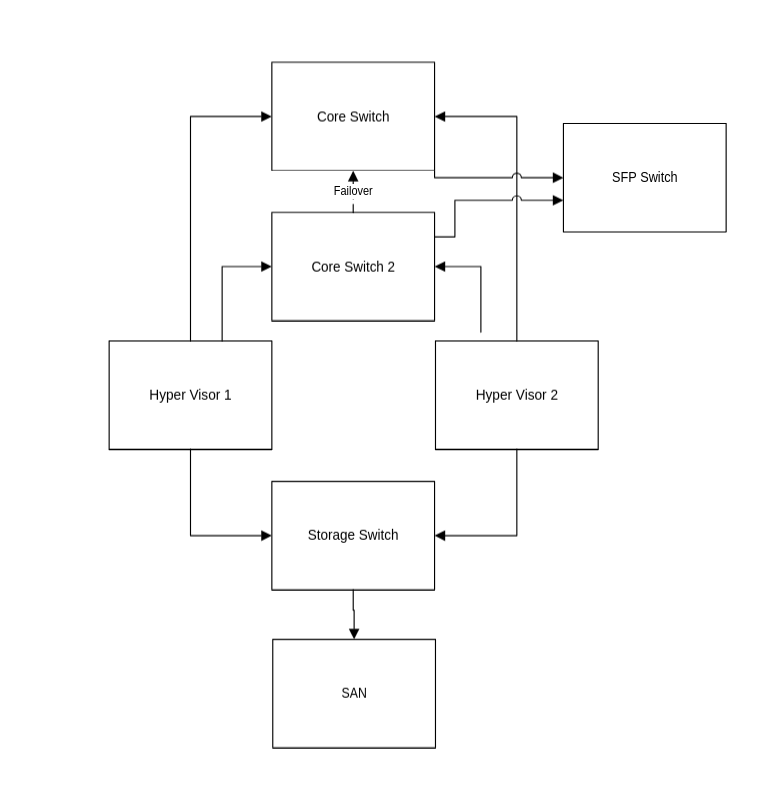
I created a Hyper-V cluster and planned the VM placement between hosts. The environment continued to use shared storage initially, but I wanted the design to keep open the possibility of using Hyper-V Replica or a different replication-based approach later.
For networking, I created three virtual switches:
- WAN switch
- VM switch
- Management switch
Storage traffic remained separate, while management, backup, and general VM traffic were not separated as cleanly as I would prefer in a future design.
If I were designing it again from scratch, I would separate management, VM, backup, and storage traffic more deliberately. The design worked, but this was one of the areas where I knew the environment could be improved later.
For VM resources, I started with broadly the same CPU and memory allocations that had been used under vSphere, then tweaked where needed. I used static memory rather than Dynamic Memory.
Before touching production, I used Visio to draw out the target design. Given the lack of existing documentation, that was useful both for planning the migration and for creating a proper record of what the new platform should look like.
Planning the migration
The migration was scheduled during the holidays in a two-day maintenance window.
All staff were emailed in advance and the two days were blocked off for infrastructure work. In practice, the work took the full two days, but actual disruption to users was minimal because it was completed during the holiday period.
The VM I was most nervous about moving was the firewall. Most server migrations carry some risk, but a firewall is different. If that does not come back cleanly, it can affect access to everything else.
I was also concerned about one older Windows Server 2012 R2 VM. There had previously been a Windows Server 2008 VM in the environment too, but I managed to remove that before the migration.
All of the VMware VMs were using legacy BIOS rather than UEFI. That meant the restored Hyper-V VMs initially came across as Generation 1 VMs. Later on, I converted them where appropriate, but during the migration the priority was getting services moved safely and cleanly.
Before starting, I tested backups and made sure I had a rollback route. I also had a separate machine available where I could test the Hyper-V configuration before touching the production hosts.
The migration method
Rather than using a dedicated VMware-to-Hyper-V converter, I used Veeam.
The process was a full VM restore from the VMware backups onto the new Hyper-V hosts. This avoided manually converting VMDK files to VHDX and meant I could use a backup platform we already trusted.
The migration was done one VM at a time.
I started with lower-risk systems, with the print server being the first VM moved. That was a good test candidate because it mattered, but it was not as risky as a domain controller, file server, MIS server, or firewall.
Before moving each VM, I removed VMware Tools. After restoring the VM to Hyper-V, I checked the Hyper-V guest/integration settings and confirmed the server behaved as expected.
One expected issue was networking. The NICs changed after migration, so IP addressing had to be checked and reassigned where needed. This is one of the small but important details in this type of migration. A server booting successfully does not mean it is fully migrated. Networking, services, DNS, application access, backups, and user-facing functionality all need to be tested.
The domain controllers were left until last. I migrated them as part of the project, then later went back and built new domain controllers properly. With more time, I would have preferred to rebuild more servers from scratch rather than carrying everything across as-is.
At the time, we were still using an RM CC4 network, so SCCM/MCEM was not part of this migration. That came later as part of the wider move towards a cleaner Microsoft-managed environment.
What went wrong — and what did not
The migration itself went very smoothly.
No VMs failed to boot. No disks failed to restore. There were no major Windows activation issues. No major services failed to start after migration.
Performance after the move was broadly the same from what I could see. This was not a migration that suddenly transformed performance. The benefit was more around licensing, management, auditability, and future direction.
The biggest learning curve for me was iSCSI.
Before this project, I had not had to make significant changes involving iSCSI storage presentation. Because the SAN remained part of the new design, I had to understand how the hosts connected to shared storage and how that needed to be configured for the Hyper-V cluster.
Backups also needed to be reconfigured after the move. That is an easy part to underestimate. Migrating the VM is not the end of the job. The backup jobs, restore process, documentation, and operational checks all need to reflect the new platform.
The slow datastore issue was also resolved as part of the storage changes, as everything was moved away from the older SAN and onto the newer SAN.
Testing after migration
After each VM was restored onto Hyper-V, I tested the actual service rather than just checking whether the VM had booted.
The checks included:
- Event logs
- Windows services
- User logons
- DNS
- DHCP
- File shares
- Printing
- Backups
- VM failover
- Host reboot behaviour
- UPS/shutdown behaviour
Where appropriate, I also had users validate key systems.
That last point matters. A server can look fine from an admin console while still not doing what users need it to do. Especially in a school, the real test is whether staff can log on, access files, print, use MIS, and get on with their day.
I also updated documentation throughout the process. One of the weaknesses of the old environment was the lack of useful documentation, so I wanted the new Hyper-V environment to be better recorded from the start.
What improved after moving to Hyper-V
The biggest improvements were management and auditability.
The environment became easier to understand, easier to document, and easier to manage within the Microsoft stack we were already using. Licensing became simpler, costs reduced, and I felt more confident managing the platform day to day.
Performance was about the same, which was fine. This project was never really about chasing a dramatic performance improvement. It was about making the platform more sustainable.
The migration also made future projects easier. Once the virtualisation layer was on a platform that fitted the environment better, it became easier to plan other improvements: server rebuilds, cleaner AD work, documentation, endpoint management, and moving away from legacy systems.
Backup and restore were broadly similar because Veeam remained in use, but overall ownership of the infrastructure felt clearer.
What I would do differently next time
The first thing I would improve is the host boot storage.
Using SSDs with software RAID was a workable route at the time, but it was not the final design I would want. If I were doing it again, I would prefer to have proper BOSS cards or another suitable hardware-supported boot solution in place before starting the migration.
I would also think harder about the storage design. The SAN worked, but it remained a central point of complexity. For a small environment, I would be very interested in a design based around replication rather than shared storage, depending on the requirements.
Networking is another area I would improve. I would separate management, VM, backup, and storage traffic more cleanly if I were designing the environment again.
I would also document the source environment more thoroughly before starting. I documented enough to complete the migration safely, but better source documentation would have made the process easier to explain and support afterwards.
Finally, I would rebuild more servers from scratch rather than migrating everything. That is not always realistic during a tight maintenance window, but a hypervisor migration is a good opportunity to ask whether each server should really be carried forward.
Sometimes a full VM restore is the fastest and safest route. Sometimes rebuilding properly is the better long-term decision.
Lessons for other small IT teams
The biggest lesson is to make the decision based on your own environment rather than platform loyalty.
VMware was not wrong for this school. It had worked. But once licensing, existing Microsoft investment, supportability, and long-term direction were taken into account, Hyper-V made more sense for us.
This was especially true in a school environment supporting around 600 devices and 1,500 users, where the virtualisation platform needed to be reliable, understandable, cost-effective, and manageable by a small internal IT team.
For anyone planning a similar migration, my main takeaways would be:
- Check licensing before assuming your current platform is still the best fit.
- Inventory every VM before planning the migration.
- Understand what each server does before moving it.
- Test backups before touching production.
- Start with low-risk VMs.
- Expect network adapter and IP configuration changes after migration.
- Remove platform-specific tools cleanly.
- Keep rollback options until you are confident.
- Reconfigure and test backups after the move.
- Document the new environment as you build it.
- Do not blindly migrate technical debt if rebuilding is cleaner.
The migration was not just about moving VMs from one hypervisor to another. It was about taking ownership of an environment that had very little documentation, reducing licensing pressure, and moving the school towards a platform that better matched its size, budget, and Microsoft-focused direction.
For us, Hyper-V was not a downgrade or a compromise. It was the more practical platform for the environment we actually had.
 ICT Field Notes